Infrastructure Vulnerability Intelligence

Discover OS Vulnerabilities
Before They Become Attack Paths

Discover exposed infrastructure, identify vulnerable software and services, and give IT and security teams the context they need to reduce operating-system risk.

Safe, controlled checks CVE intelligence Clear fix guidance
Complete Host Security Visibility

See What Every Server and Endpoint Is Exposing

Authorized targets only Centralized exposure view
STEP 01DISCOVER

Detect Active Hosts

Determine whether each authorized target is reachable and responding before deeper security checks begin. forge-sec establishes a reliable inventory of active servers and endpoints across the approved scope.

Which systems are currently reachable?

STEP 02MAP

Find Open Ports

Identify exposed TCP and UDP ports that could provide attackers with an entry point. See which network services are externally accessible and where unnecessary exposure should be reduced.

Where is the network exposed?
STEP 03IDENTIFY

Profile Services and Systems

Discover SSH, HTTP, FTP, database, mail, and remote-management services with their detected versions. Analyze response patterns and fingerprints to identify the probable operating system and platform configuration.

What is running on every host?
STEP 04INVENTORY

Map Software Exposure

Build one structured inventory of exposed applications, packages, services, technologies, operating-system details, and security controls associated with every scanned host.

What needs security attention first?

Detect, Assess, and Prioritize Host Risk

forge-sec connects authorized hosts to a controlled OpenVAS-based assessment workflow, helping teams detect operating-system and service vulnerabilities with clear evidence.

Explore reporting evidence ->
OS Scanner
01

Remote Security Checks

Assess ports, protocols, exposed services, detected versions, and network-accessible weaknesses without logging into the host.

02

Authenticated Host Checks

Use approved credentials or SSH keys to inspect installed packages, patch status, local configuration, and hidden weaknesses.

03

CVE and Patch Intelligence

Correlate affected software and missing updates with known CVEs, vendor fixes, severity, and available remediation.

04

Configuration and Lifecycle Risk

Find weak protocols, exposed administration, unsafe settings, unnecessary services, and unsupported technology, then prioritize by impact.

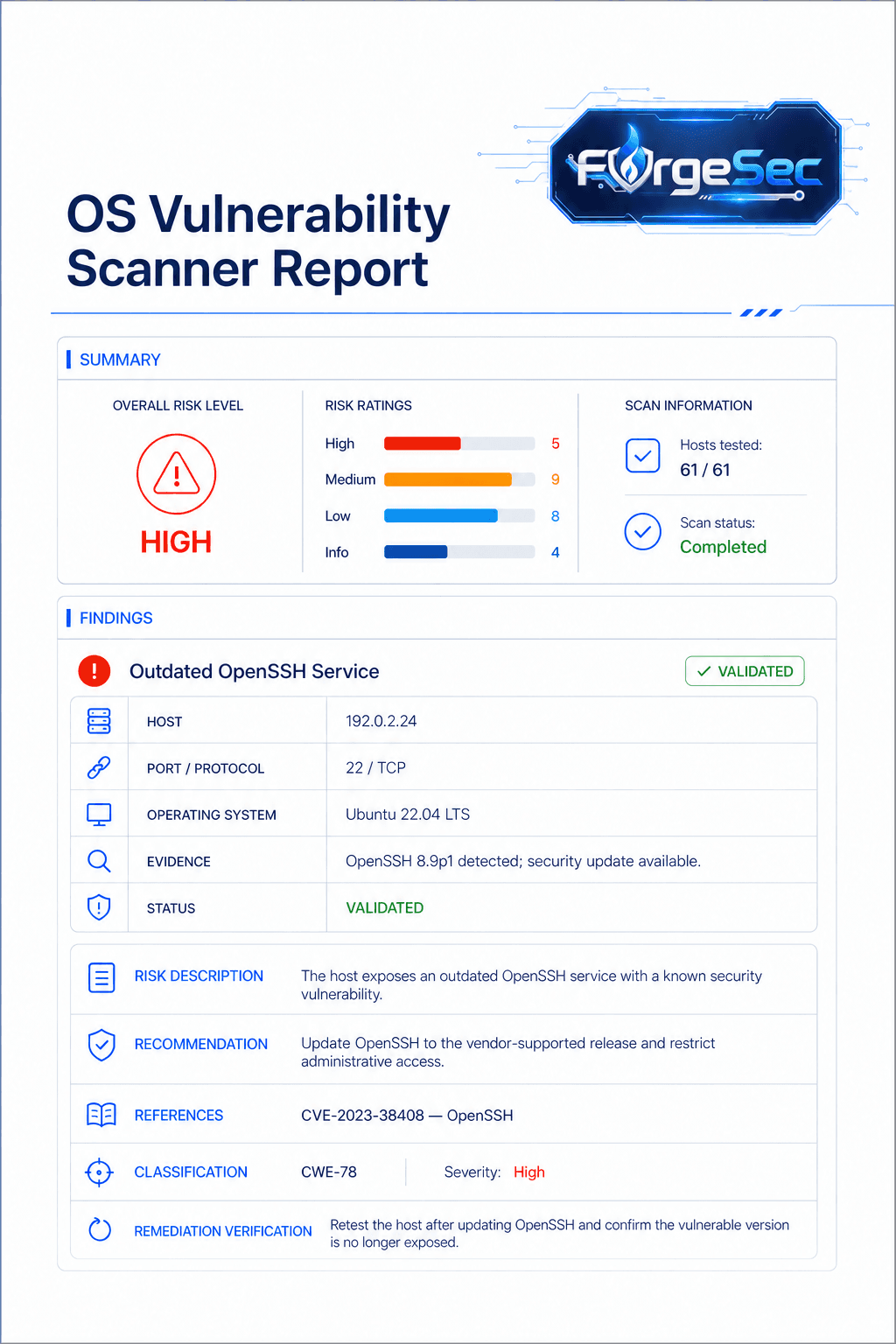
Every validated finding includes the affected host, port, protocol, service, detected version, severity, technical evidence, potential impact, and recommended remediation.

04 / REPORT Actionable Vulnerability Reports

Evidence-backed reporting built for remediation

Turn raw OS scan results into clear findings with severity, affected assets, technical evidence, and practical remediation guidance.

01Affected host, port, and protocol
02Detected service and software version
03CVE, CVSS score, and technical evidence
04Security and business impact
AVAILABLE EXPORTSPrintable PDFCSV exportCanonical JSONExecutive summary
forge-sec OS vulnerability scanner report showing risk ratings, host evidence, remediation guidance, and validation status
05 / MONITOR Continuous OS Security

Keep your infrastructure risk picture current

Systems change every day. forge-sec continuously tracks exposure, validates remediation, and helps teams respond before small changes become security gaps.

CURRENT SECURITY POSTUREProtected & monitoredLast assessed today at 04:32 UTC
92/100
HOSTS248FIXED37NEW RISKS04
NEXT CONTROLLED SCANToday, 22:00
01

Scheduled Scanning

Run approved assessments automatically across defined hosts and maintenance windows.

02

Exposure Change Detection

Identify new hosts, open ports, changed services, and software drift as they appear.

03

Risk Re-Prioritization

Continuously rank findings using severity, exposure, asset importance, and fix status.

04

Remediation Verification

Retest resolved findings and preserve clear evidence of closure for every asset.

CONTINUOUS ASSURANCEKnow what changed. Verify what was fixed.
Start continuous monitoring ->
06 / PROCESS Structured Host Assessment Workflow

How Does the OS Vulnerability Scanner Work?

01

Configure the Target

Add an authorized IP address or hostname, select Light, Full, or Authenticated scanning, and choose an immediate or scheduled start time.

02

Verify Availability

Confirm that the target is reachable and responding, then establish a reliable baseline before deeper assessment begins.

03

Discover Exposure

Map open ports, network protocols, running services, response banners, and detected software versions across the approved host.

04

Detect the OS

Analyze network fingerprints and service responses to identify the likely operating system, platform, and host configuration.

05

Perform Security Checks

Run controlled remote checks or approved authenticated checks for vulnerable packages, missing patches, exposed services, and configuration weaknesses.

06

Correlate Vulnerabilities

Connect detected services, packages, versions, and configurations to known CVEs, severity data, and current security intelligence.

07

Prioritize Findings

Organize validated issues by severity, external exposure, exploitability, operational impact, and the remediation effort required.

08

Remediate & Retest

Rerun the assessment after patching or reconfiguration to verify each fix and preserve clear evidence of closure.

Start With Clear Host Visibility

Find OS risk before it becomes an attack path

Controlled assessments Evidence-backed findings Remediation-ready reports